
World model and Map
A map of your platform that nobody draws,and that says what it doesn't know.
kanman reads the repositories, catalog, monitoring, dashboards and incidents you already connected and keeps one model of how they fit together. Nobody fills in a questionnaire. When a source changes, kanman reads it again.
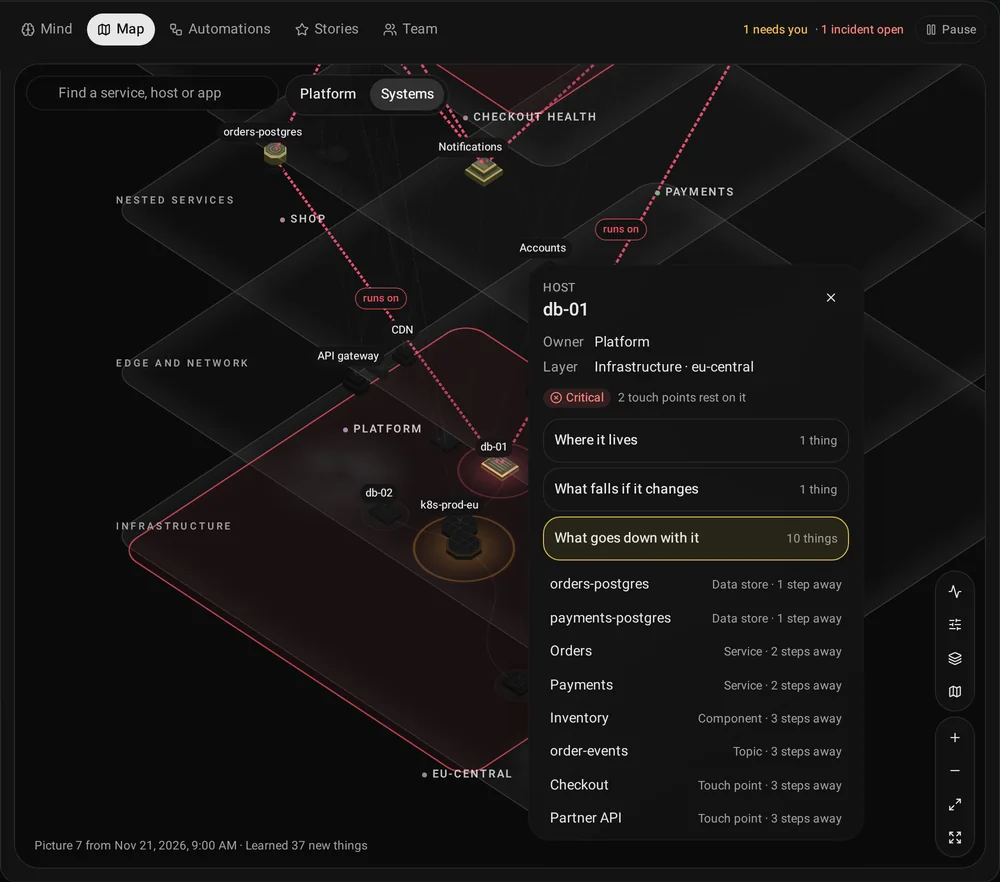
Pick a host, see what goes down with it
Built from what you run
Three tools, three names, one host
Checkmk calls it db-01.shop.internal, a Grafana panel queries db-01, a deploy file has its address. kanman joins them by the evidence and says how sure it is. The service a dashboard shows, the image it runs and the repository that deploys that image end up as one thing.
- Where no catalog has an entry, kanman describes the service from what belongs together and marks it as its own inference
- What a system no longer lists drops out of the model
- Backstage is read every six hours, Checkmk every two minutes, and a changed README or manifest is read again on its own
- Checkmkdb-01.shop.internal
- Grafanapanel query: db-01
- Deploy file10.0.4.12
- One hostdb-01, with all three sources
Five layers
From the host to the checkout, one click apart
Things that work together sit together, and each keeps its place between visits, so the Map is learned like a city. Your team’s part opens first, inside the whole workspace, so dependencies on other teams show.
-
Infrastructure db-01
Hosts, clusters, networks and sites.
-
Edge and network API gateway
Gateways, load balancers, proxies and firewalls.
-
Nested services orders-postgres
Workers, queues and data stores the services use.
-
Services Orders
What sits behind the touch points, grouped by domain and team.
-
Touch points Checkout
What customers touch: features, apps, pages, public APIs.
Health comes from your monitoring: green, amber or red.
Answers, not a diagram
Every card on the Map answers three questions
The same answers come in the team chat: ask “What breaks if I change the payments service?” and kanman replies with a small map drawn from the same version, with Open on the Map one click away.
Where it lives
From the team down through the services to the host.
What falls if it changes
Everything downstream through calls, APIs and shared packages.
What goes down with it
Everything that runs on it or calls it at runtime, up to the touch points customers use.
Grey means kanman doesn’t know. It never means all is well.
Things kanman can’t place yet wait in a separate area instead of a guessed spot. Fog lies over parts it knows little about, with the connection that would clear it. Each fact says whether a source declared it, kanman observed it or read it in a document, how sure it is and when it was last seen.
When the Map is wrong
The fix goes where the wrong fact lives
A correction to kanman alone would leave the README, the catalog and the alerts wrong for everyone else who reads them.
-
Lena: “Payments runs on app-03 now, not app-02”
kanman notes it with her name and the date. It never overwrites the source silently: the Map shows both as a disagreement.
-
It finds where app-02 came from
A line in the payments repository’s
catalog-info.yamland a host still listed in Checkmk. -
A merge request, ready to accept
For the file, a story that opens a merge request under the team’s usual rules. For Checkmk, a ready change for whoever looks after it.
-
Mira approves the merge request
Nothing changes in a repository or a tool without the usual approval.
-
The source agrees again
kanman reads the file again, the disagreement disappears and Lena hears it in the same conversation.
Shared across the workspace, careful with what is private
A ready entry for your catalog
A service nobody wrote down comes back once, in the team’s next brief, as a ready catalog-info.yaml with its ServiceNow CI and Grafana label. Yes, open the merge request adds the file like any other change.
Read inside your network
A Backstage or Checkmk that only your network reaches is read by your runner. kanman’s cloud never connects to it.
Private sources stay private
Other teams see the thing and its connections, never the private documents, dashboards or descriptions behind them. Map cards in the chat follow the same rule.
Works with the keyboard and on phones
Arrow keys, + and -, / to search, and reduced motion. On a phone, or where 3D isn’t available, the same Map is drawn flat with the same answers.
Questions platform teams ask first
Do we install an agent or draw anything?
No. kanman reads what your connections already let it read, with their rights. More connections make the Map sharper: fog clears, unplaced things land on their hosts, dashed lines turn solid.
Does everyone see the same picture?
Yes. Opening the Map draws the current version, so everyone in the workspace sees the same picture, and the chat’s map cards come from the same version.
Does it work if everything runs on our own runners?
Yes. The answers in the chat, the map cards and the reads of systems inside your network all work in a workspace that runs everything on its runners.
See your own platform on the Map.
Connect a repository and your monitoring, and kanman starts drawing the first picture.
Team plan, no card needed