
Apps
The tool nobody got round to,built beside the chat, live when you say so.
Every step between the sentence and the live app is one you can see. kanman checks each version before anyone else opens it and runs app code only on your team’s own runners, inside your network, never in kanman’s cloud.
Enterprise, on your own runners
Before: one sentence
Show me returns per carrier this week, with a filter.
-
Build
v1 opens beside the chat while kanman builds it, with its own data store on the team’s runner.
-
Flow check
kanman fills in a return note, saves, reloads and finds the record, like a teammate would.
-
Version
Each change is a version. v5 waits beside the live v4 until someone compares them.
-
Make it live
A person who may change the app makes it live, once its tests pass.
After: the app
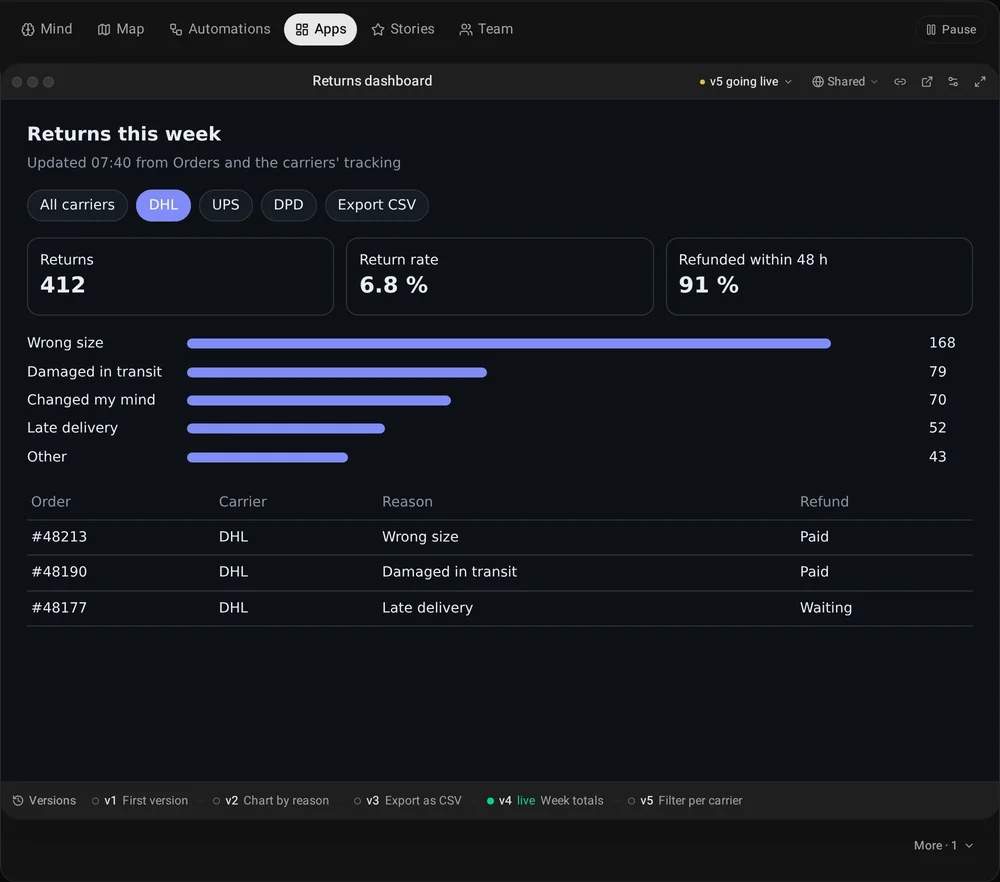
One app, start to finish
The Returns dashboard, from Lena’s sentence to its fifth version
What the Support team sees while kanman builds and then changes one app.
-
Lena asks for a returns dashboard
The app’s page opens beside the chat at once: first kanman’s plan as a skeleton, then the real app as it takes shape.
-
“No, group them by week”
Lena says it while kanman works, and it takes the change. The app gets its own data store on the team’s runner, and an automation keeps its table current.
-
kanman’s check before anyone else opens it
No key in the code. The carrier’s tracking host becomes a rule with host, port and purpose, and Lena allows it. Then kanman fills in a return note, saves, reloads and finds the record.
-
Lena makes v1 live for the team
She sets it to Team. Anyone on the Support team can now open it and ask for changes in the chat beside it.
-
Theo asks for a filter per carrier
v5 waits beside the live v4. Compare cross-fades between both in the same place in the app, and kanman lists what is new on screen.
-
v5 goes live, v4 stays one Restore away
Restore brings an older version back after one confirm, its code and its data together.
The check before live
Every app goes through it before anyone else opens it, whether kanman built it or someone shipped it from Claude Code, and again each time it is shared more widely.
| kanman looks for | What happens |
|---|---|
| Keys or tokens in the code | No app is stored or published with a key in its files. kanman offers to move it to the team’s secrets. |
| Outbound calls | Every host the app calls becomes a rule you allow or block. The network on your runner enforces it; anything not listed is blocked. |
| Routes outsiders call | Webhooks and other incoming routes become rules too, allowed one by one. |
| Data your rules keep apart | If the app combines sources your team keeps apart, you drop one or ask a lead. |
| Another app’s data | Not reachable: each app reaches only its own data store. |
| Personal data and accessibility | Personal data in the app’s store is flagged before wider sharing; accessibility gaps come with what to fix. |
Rules for apps
The wider the audience, the higher the bar.
A page for yourself should take a minute. An app the whole organisation relies on gets real engineering first.
-
Just me
kanman keeps the versions. Anyone who may change it publishes.
-
My team
A health check. Rules and design findings shown, not enforced.
-
Several teams held back if missing
A real repository, lint and tests green, at least one test, staging first, alerts to the owning team. A lead publishes.
-
Whole organisation held back if missing
Your workspace’s reference checks on top, a test for every data change, uptime monitoring and a named owner. A workspace admin publishes.
The rules start in report only for two weeks from the first time an app is shared, then they hold. Teams can add to them, never take any away.
Your network
App code and its data stay on your runners.
kanman’s cloud keeps the conversation, the versions and the catalogue. The app itself, its data store and its backups live on your team’s runners. IT decides whether browsers reach apps through kanman or directly on the company network, and can switch the path through kanman off.
- Each viewer sees data from your connections with their own rights, never the owner’s
- Secrets are set in the app’s settings and reach it when it starts, never in its files
- Staging runs on sample records by default and never gets the live secrets
- An app’s address never names a runner, so it stays the same when runners change
Your network
- Runnerapp containers, pinned base images
- App dataits own store, backed up
kanman cloud
- Conversationversions, checks, catalogue
After the demo, the app is still looked after.
A daily base image
In the app’s quietest hour kanman updates its base image and checks it again. If the app does not come up, the runner puts it back on the image before and tells the owner once.
Watched like a service
When a source the app reads changes, a renamed field or a removed job, the app says what changed and its owner hears about it before anyone has to report it.
Data backed up first
Before every change to how an app stores its data, kanman backs the data up. A restore brings code and data back together.
Or kept in a repository
Apps can live in your GitLab or GitHub. Every merge request, kanman’s or an engineer’s, gets kanman’s check as a commit status, and a merge deploys.
What IT and team leads ask
Who can make a version live?
People who may change the app, and only once its tests pass. For several teams a lead of the owning team publishes, for the whole organisation a workspace admin.
What if the flow check fails?
On the opened version, kanman’s cursor replays the check over the app step by step, so you see exactly where it failed. Making it live stays a person’s decision, and it waits for the app’s tests.
Can we bring apps we already have?
Yes: from a repository, a zip, a Lovable project or a Figma page, or shipped from Claude Code. Each goes through the same check before it is live.
Why Enterprise only?
App code runs only on your own runners, inside your network, and own runners are part of Enterprise. Pages built from kanman’s own cards need no runner.
The dashboard you never got round to.
Apps come with Enterprise, which you start in the app. Then ask for the first one in the chat.
Team plan, no card needed